Thursday, 2 May 2019

Primary Movie Makers Update

A quick reminder and update for the Primary Movie Makers 2019 event launched earlier this year… 
  
All entries for the movie competition need to be submitted by June 10th 2019. Could all entries be uploaded to the following shared Google Drive:  

 
This link is for a shared drive. No logins are needed, though could all movie entries be saved with a suitable name which includes the name of the school and the name of the movie. It would be great if an additional document which describes the movie and includes the name and Year Group of the movie makers were also uploaded as this would add context.  
  
Any schools taking part in the competition are invited to attend a screening of all the Movie entries on the 3rd of July 2019 at High View School. To help with numbers for this event, could School please sign up using the PTSA Event booking system. 


Wednesday, 13 March 2019

Making the most of your iPads...

A question that comes up a lot at the Hub meetings and on social media is the question of what are the best apps to use on iPads in the classroom? So... below is a list of apps that have been tried and tested at my school and are currently used lots. Also included are apps that have been highly recommended by other schools...

Spark Adobe
This is a fantastic app for allowing children to share/present writing outcomes in a more interesting and engaging way. The app has built-in templates that are easy for the children to follow and, once published, the outcomes look professional and slick!


Green Screen
When producing Stop-Motion films, our favourite iPad app is Green Screen. Choosing this app came after a lot of trial and error when trying out suitable apps, but this one is fantastically easy to use as well as consistently reliable. It also hosts a range of built-in features that make it a must-have for producing stop-motion films!

Stop Motion
This is an alternative to the Green Screen app. It is an easy to use app that allows the user to create stop motion movies and also includes useful built-in features. Good, but not as polished at Green Screen in my opinion.

Morfo
Morfo is a brilliant app I saw being used in a classroom a couple of months ago. It was being used as part of a History and English lesson where the children were being asked to write the dialogue for an interview between themselves (as reporters) and historical here, Sir Francis Drake. The Morfo app allows the user to upload an image of someone onto the iPad which can then be easily manipulated so that the eyes, nose and mouth can move. The fact that the mouth can move is brilliant because as the user speaks into the iPads microphone, the mouth reacts and looks as though it is speaking. This app can also record the speaking and alongside the use of the iPads built-in camera whole conversations can be recorded and edit together to produce an interview! When I watched the lesson being delivered, the children were unbelievably engaged! A fantastic use of the app!

iMovies
An essential app for movie making! It is an Apple classic and remains one of the most used and reliable apps for editing and producing movies. It can be used alongside iMovie software on a Mac (if you have one) or simply used on the iPads itself. iMovies has an enormous amount of built-in editing features as well as some great professional looking templates which can be sued to produce fantastic outcomes that the children will be both amazed and proud of!

Accelerated Reader
For schools that use Accelerated Reader to support the reading, then this app is essential as it provides students with instant access to the enormous online quiz database allowing children to quiz instantly once books have been completed. A must-have for Accelerated Reader schools!

Garage Band
This is one of my absolute favourite apps that I use both in and out of the classroom! If you've not used it before, then it is a must (especially if you're trying to embed technology into the teaching of Music)! The Garage Band app is full of built-in music features that allows the user to quickly and easily produce their own musical creations.

Scratch Jr
This app from Scratch is aimed at KS1 children as is great at introducing the basics of block coding. It has an easy to navigate screen and is ideal for schools looking to use technology to start the teaching of coding and algorithms in KS1...


Comic Life 3
A fantastically simple to use app that allows children to publish writing ideas in an engaging and more interesting way. As with most apps, it has easy to use templates built and is loved by children (and adults)!

Book Creator
Again, another great app that can be used to share writing outcomes. A simple and easy to use app that the children love as it makes their work look instantly amazing! :)


Bee Bot
This is an app that can be used alongside physical Bee Bots as it uses all the same controls and ideas. A great app for KS1, especially as the children, love them built in scenarios and games.


Tynker
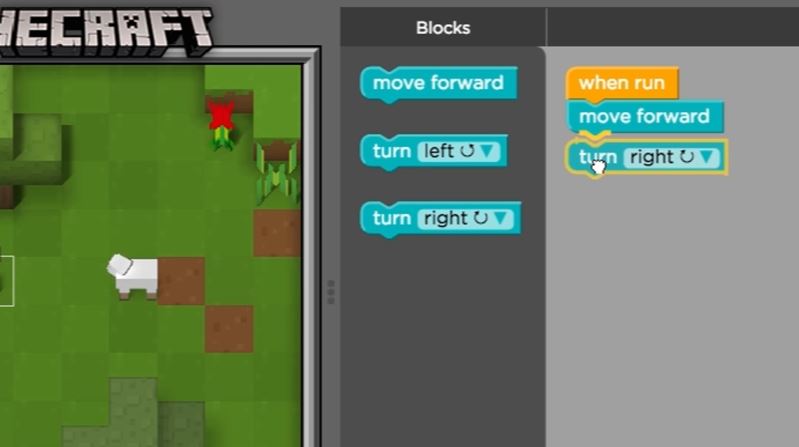
Like Scratch and Scratch Jr, this app teaching coding through blocks. The great (and most engaging) part of this app is the many game-based scenarios that are built in (including Minecraft!). A great to have and use, especially for teachers who are not too confident when delivering Computing. This also an app that is used lots at the Apple Store and is highly recommended by them.


Swift Playgrounds
This another comprehensive app teaches coding through fun, game-based scenarios. It comes highly recommended by a number of schools and teachers within Plymouth as it covers so much of the Coding elements of the Computing curriculum! Again, a great app for those not confident in teaching Computing, but want to ensure coverage is being met.

Times Table Rockstars
The must-have app for schools that use TT Rockstars to support the teaching and learning of times table skills. A great app!


To sum up... as said at the beginning, this list has been compiled through trial and error and recommendation, but what's missing? Feel free to suggest more and i'll add them to the ever growing list...

Monday, 11 March 2019

Update: Purple Mash Gaming Event

There have been a few inquiries from schools regarding the Purple Mash Gaming Competition (such as cost implications, prizes, and the number of children allowed to take part). 

I hope these answers help:
1) There is no cost implication - The event is free as Purple Mash are hoping that people will be so impressed that they sign up after the event. The only costs for schools will be to provide transport.

2) In terms of prizes, Joe (who is organising the event) has managed to secure 5 Android Tablets!


3) Currently, 1 team per school can enter with 5 members per team (though maybe more can enter closer to the event depending on the number of schools signing up.


Just a reminder, that if you haven't signed up so far (or to the free CPD Training Event, click the links below:
Purple Mash 3D Gaming event:

Purple Mash Software Training: 

50 Tools to inspire students with Chromebooks

Message from Vicky (via our Facebook page) that I thought it'd be worth sharing here too...

At the hub meeting we talked about sharing useful software. I have added a document with lots of different apps to support learning across the curriculum. It is android and chrome based, but you might find some of them useful. It can be found in the files section of this page. Please share (or comment below) if you find any of them particularly good.

file:///C:/Users/ecarr/Downloads/50%20tools%20to%20inspire%20students%20with%20Chromebooks.pdf


Sunday, 10 March 2019

Code.org

Kath, our rather brilliant Computing HLTA at Riverside, finished the meeting with a segment on code.org. For those unfamiliar with code.org, it's a brilliantly free (yay!) resources full of step-by-step coding projects that greatly appeal to all age ranges and phases.


The other great thing about code.org (apart from the "free"-ness and many projects) is the fact that you can set classes up on it and can track the progress of the children as they work their way through each project.


It's a truly brilliant resource that grows and grows each year and is fantastic for schools/teachers who lack subject confidence with coding but are keen to see their children progress. Definitely worth a look!

Scratch 3.0 and the "classroom" option...

Ben (PLE) from Thornbury spoke about the use of the new "classroom" option in the updated version of Scratch, Scratch 3.0.

This new version of Scratch (finally) allows teachers the opportunity to upload whole classes to Scratch so that they can work on coding projects together. This is a big improvement on the previous version of Scratch which had users individually creating accounts in order to be able to save and share work. I know some schools were reluctant to do this, and consequently missing out on the brilliance of Scratch.

Ben indicated that the new version of Scratch is also much cleaner and crisper than the old one and seems more table friendly than the old one did. It also has some neat new features including easy links to pre-designed projects that can quickly link to Makey Makey!


However, he and a number of others indicated that the new version still has a few bugs to work out but I suppose this is to be expected in new software. The other frustration shared by those in the room was the fact that so many resources have been created in the past to be used with Scratch 2.0 and that these are now fairly useless as they don't match the screen layout of new Scratch! Although this can't be changed, it is indeed a frustration for busy teachers who've spent a long time planning and resourcing units of work!

That said, new Scratch does have a number of great improvements and so far it hasn't stopped the children at my school from continuing to enjoy coding using it :)

Saturday, 9 March 2019

BBC Micro:bits

Teresa (PLE) from Shakespeare school shared her experiences with the BBC Micro:bits. Inspired by a previous Hub Meeting where a colleague from St. Georges explained that she had hired the Micro:bits from the Plymouth Library Service, Teresa was curious about how good they were and how engaged the children in her school would be.

Interested, Teresa contacted Plymouth Library Service and hired a class set and found the effect staggering! After a brief history of the aims and evolution of the Micro:bits (which is worth a read to give some background), She explained that despite the rather simple look and feel of the Micro:bits, the children loved coding with them and unbelievably engaged in the process of creating algorithms for the devices.

Furthermore, Teresa explained that the amount of additional learning and skills used by the children during the process of coding and uploading code to the device further developed and strengthen existing IT confidence. The contagious effect of the Micro:bits spread through the school, and very soon all KS2 classes had gotten the bug. Not bad for an experiment to see if they'd be any use or not! :)

Following a very successful trial, Teresa is now looking to buy a set for the school so that learning and coding with the Micro:bits can be firmly embedded into the schools Computing curriculum.

After a glowing review, I'm already looking to hire a set from the Plymouth Library Services, and if you haven't used them yet, then I would too :)


More about the Plymouth Library Services BBC Micro:bit loan system can be found here:
https://www.plymouth.gov.uk/libraries/childrenandyoungpeople/microbitslibraries